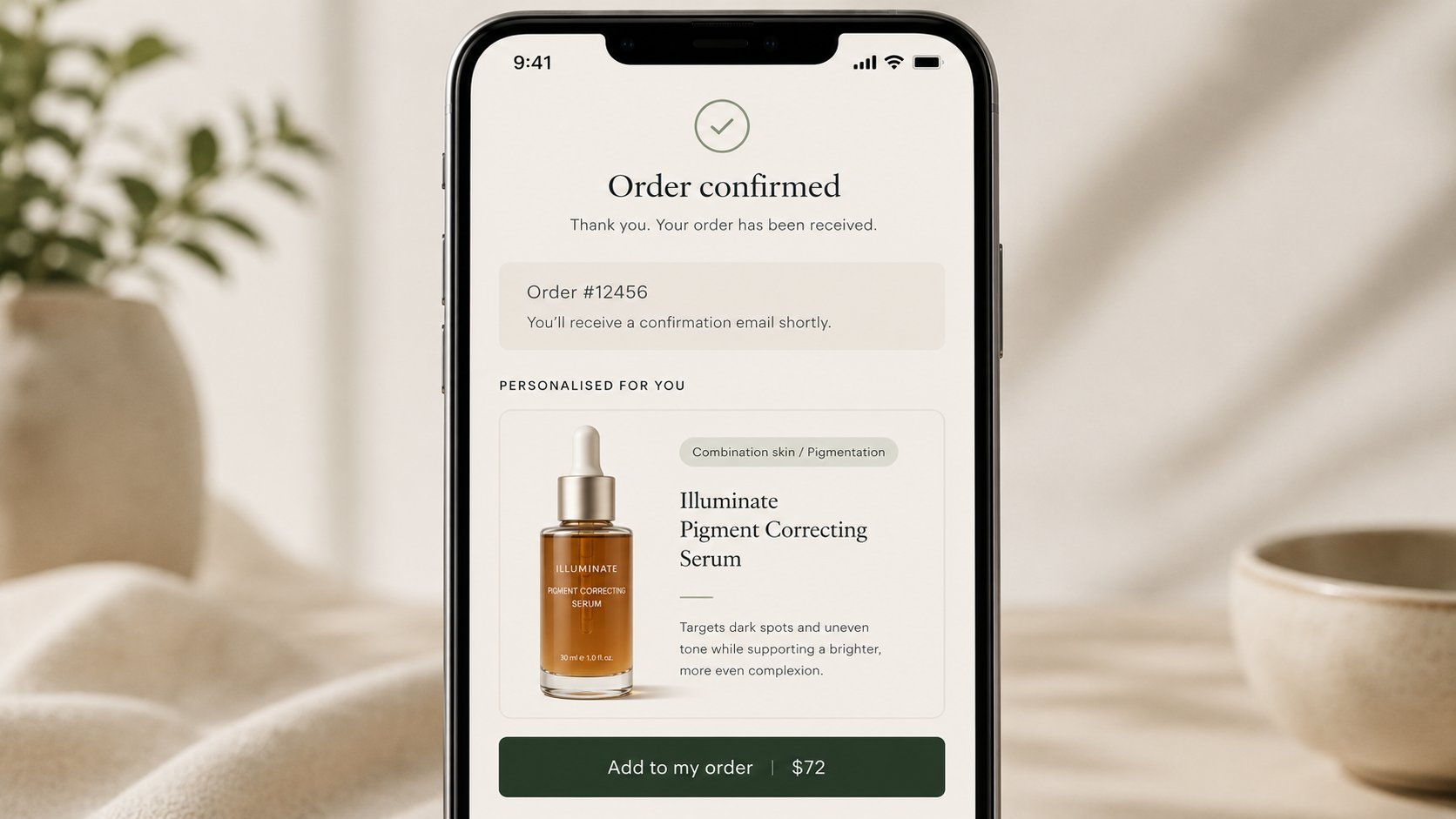
How to Turn Shopify Checkout Into a Personalized Upsell Engine
She had solved the matching problem.
Six weeks after launching the quiz, the founder in Pune was looking at a return rate that had dropped from 14 percent to 6 percent on her hero serum. Her support inbox had quieted. Her customers were arriving at the right product the first time, because they had told her exactly what they needed and she had listened.
But she was looking at another number now. And this one was harder to explain away.
Her post-purchase upsell was not working.
She had set it up the way most Shopify operators do. A third-party app sitting between the order confirmation and the thank-you screen, showing a “you might also like” carousel of three products. Customers who had just bought the serum were being shown a vitamin C booster, a night cream, and a facial mist. All reasonable suggestions. All completely generic.
The attach rate was 4.2 percent.
She called me to ask if that was normal. I told her it was actually above average for a cold carousel. Then I asked her what she knew about the customer in the moment that carousel was showing.
She thought about it. “I know what they just bought.”
I asked her what else she knew.
Another pause. “I know their skin type. I know their primary concern. I know what gaps they said they had in their routine. I collected all of that in the quiz.”
So why, I asked, is the upsell showing them a generic carousel instead of the one product that the quiz already identified as the logical next step in their routine?
She did not have an answer. But the question was the whole problem.
The gap between knowing and using
This is the most common failure mode I see in D2C checkout strategy. A brand invests real effort into understanding the customer at the top of the funnel, and then forgets everything it learned the moment the transaction is complete.
The quiz had written her customers’ skin profiles directly into Shopify Customer Metafields. The data was sitting there, structured and permanent, every time a customer hit that post-purchase screen. The upsell app had no idea it existed, because the app was not built to read it. It was built to show a carousel. So it showed a carousel.
This is not a technology problem. It is an architecture problem. And Shopify’s Checkout Extensibility is the tool that closes the gap.
What Checkout Extensibility actually changes
Most founders hear “Checkout Extensibility” and picture a settings panel somewhere in their Shopify admin. It is not that. It is a fundamental redesign of how logic can be applied at the most valuable moment in the customer lifecycle.
Before this architecture existed, modifying what happened inside or immediately after the checkout required injecting custom code into a checkout template that Shopify did not officially support editing. It was brittle. It broke during platform updates. It created security surface area that Shopify’s compliance frameworks did not cover. And it ran outside the performance sandbox, which meant every clever upsell widget was silently taxing your Core Web Vitals.
Checkout Extensibility replaces all of that with a sandboxed environment built on UI extensions and WebAssembly components. Your post-purchase logic runs inside Shopify’s own infrastructure, not bolted onto the outside of it. It has direct, native access to the order that just completed, the customer profile attached to that order, and the live inventory state of your entire catalogue.
That last part is what matters for what she needed to build.
Building the intelligent post-purchase offer
The implementation she eventually built has three moving parts, and the logic connecting them is simpler than it sounds.
The first part is the trigger condition. When an order completes, the post-purchase extension reads two things: the product that was just purchased, and the customer metafield where the quiz wrote the skin profile. If the customer said their primary concern was pigmentation and they just bought the serum formulated for pigmentation, the system knows they are mid-routine. They have the treatment. What they do not have yet is the booster that enhances it.
The second part is the product selection. Instead of a static carousel, the extension queries the Storefront API in real time with the profile data as parameters. It returns one product. The one product that the quiz logic already identified as the correct next step for this specific skin type and concern combination. Not the three most popular products in the vitamin C category. The one product that makes sense given what this customer told her four weeks ago when they first visited the store.
The third part is the inventory check. This is where the legacy approach used to create operational nightmares. An out-of-stock item appearing in a post-purchase offer generates a confirmed sale that cannot be fulfilled. Checkout Extensibility communicates directly with Shopify’s inventory ledger. If the recommended product is below the buffer threshold she set, the system skips it entirely and surfaces the next match in the logic queue. The customer never sees a product that cannot ship tomorrow.
Why the post-purchase window is the only place this works at full power
There is a reason this logic should live here and not on the product page or inside the cart.
On the product page, a recommendation creates a fork. The customer can choose the original product, choose the recommendation, go back and compare, or leave entirely. You are introducing optionality into a decision that has not yet been made. Every option you add is a potential exit ramp.
Inside the active checkout sequence, the same dynamic applies. A cross-sell attempt before payment is processed is a gamble with the primary transaction. One moment of friction, one unexpected line item, one question the customer did not want to have to answer, and the cart gets abandoned.
The post-purchase window is structurally different. The primary order is already confirmed, already paid, already sent to the order management backend. A rejected upsell at this stage has a zero percent chance of costing you the original sale. The customer has already made the hard decision. You are asking them to make a much easier one: do you want the thing that goes with what you just bought?
And because Checkout Extensibility enables one-click authorization, the secondary purchase does not require the customer to re-enter their card details or shipping address. Those are already in the system from the transaction they just completed. The friction has been reduced to a single binary choice: yes or no.
The trust is at its peak. The data is already in the room. The only question is whether your checkout is smart enough to use it.
What this does to the math
Her attach rate moved from 4.2 percent to 11.8 percent over the following sixty days.
That number needs context to mean anything. At her average order value of around three thousand rupees, the upsell product was priced at roughly twelve hundred rupees. Before the rebuild, on a hundred post-purchase screens shown, she was capturing four secondary transactions. After the rebuild, she was capturing almost twelve.
But the number that changed the shape of her P&L was not the attach rate itself. It was the CAC on those twelve transactions.
Every post-purchase sale carries a customer acquisition cost of zero. The customer was already acquired. The ad spend, the influencer fee, the discount code that brought them in, all of that cost is attributed to the primary order. The secondary transaction is pure incremental revenue, and its only costs are the product and the fulfilment.
At a 40 percent gross margin on the upsell product, that incremental revenue flows almost directly to Contribution Margin 3. When you are building toward a 5:1 LTV to CAC ratio, there are very few levers that move it this cleanly. The quiz improved both sides of the equation simultaneously, as we covered last time. The intelligent post-purchase offer improves the LTV side without touching the CAC side at all.
The quiz told her who her customer was. The checkout used that knowledge at the moment it was worth the most.
The compounding effect she did not expect
Three months after both systems were live together, she showed me something I had not anticipated seeing so quickly.
Her email retention flows had started performing differently. Not dramatically. But measurably. The thirty-day reorder sequence, the one targeting customers who had bought the serum but not yet returned, was converting at a rate about 2 percentage points higher than before.
The reason, when we dug into it, was straightforward. The customers who had taken the quiz, bought the serum, and then purchased the booster through the post-purchase offer were a different cohort from the ones who had only bought the serum. They had more invested in the routine. They had made two consecutive decisions that reinforced each other. The booster made the serum work better. The serum made the booster feel necessary. By the time the thirty-day email arrived, these customers were not being asked to remember a brand they had tried once. They were being asked to restock a system they had already built.
This is what the series has been building toward from the beginning. Each layer compounds the one before it. The margin discipline from the earliest posts funds the ad spend. The ad spend brings in qualified traffic. The product page converts that traffic without leaking trust. The retention flow extends the lifetime of each customer. The quiz lowers return rates and sharpens targeting simultaneously. And the intelligent checkout turns the single highest-trust moment in the customer relationship into a revenue event that costs nothing to acquire.
She is not spending more to grow. She is extracting more from what she already built.
That is the whole argument.
This is post ten in the series on D2C profitability on Shopify. The earlier posts cover retailer margin costs, ad attribution, discounting’s hidden tax, store design, membership commerce, the 90-day retention flow, the product page, the post-purchase upsell, and zero-party data. If you have not read them, start from the beginning.
If you want to build a native, data-connected checkout experience on Shopify, Brainium engineers this end to end.

Recent Comments
Related blog posts
The Work That Got Cheap and the Work That Got Precious
Last week I gave a talk to a hall full of computer science students at Brainware University, and I opened it by telling them that most of what their d
Read More
From Loudon Street to a Garage in Ekdalia
What I learnt over coffee with the man who built Bhojohori Manna There are people who tell you their story and there are people who let you sit insid
Read More
IT Directors Need People, Not Software
Somewhere in Manchester right now, an IT Director is staring at a Gantt chart that ended three months ago. The ERP went live. The consultants held a c
Read More
The Two-Project Problem
A retail founder once told me his app team and his ERP team hadn't spoken to each other in four months. Not because of a conflict. Because nobody's jo
Read More
Why Your Buying Process Is Killing Good Sales Deals
Last year, a VP of Engineering at a mid-sized UK retail firm found Brainium through a search. He read enough to be interested. He filled out the conta
Read More